

Room Escape Game Password Clues Props Lantern Light Flashing Prompt Escape Room Key to Run Away Adventure Room
Product details
| Management number | 208479507 | Release Date | 2026/03/22 | List Price | $95.96 | Model Number | 208479507 | ||
|---|---|---|---|---|---|---|---|---|---|
| Category | |||||||||
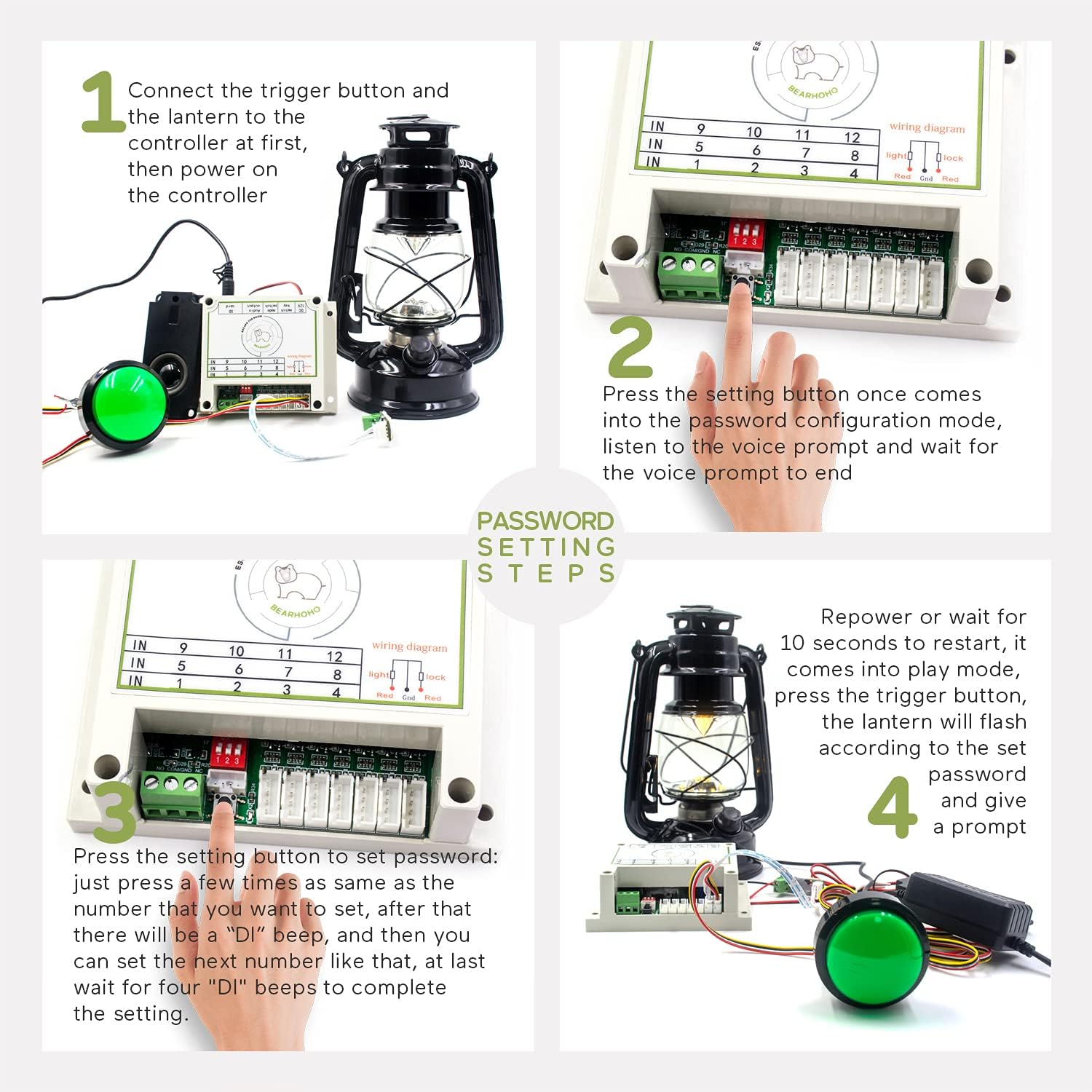
This is a password clue props, the controller is connected to the power supply, the LED lantern and the trigger button need to be inserted in a fixed position, the position cannot be changed at will, and it can be integrated into a variety of decorative scenes. HOW TO PLAY Players need to find the lantern and the trigger button in the escape room, then press the button to observe the pattern of lantern flashing to find the password, and run away from the room. MODIFY THE PASSWORD 1. Connect the plastic button and the lantern to the controller at first, the button must be inserted at the first position on the right side of the controller, and the lantern must be inserted at the second position. 2. Then power on the controller. 3. Press the setting button once, there will be a "DIDI" sound, and also you can hear a voice prompt. Listen to the voice prompt and wait for the voice prompt to end, it comes into the password configuration mode. 4. Press the setting button to set the password, just press a few times as same as the number that you want to set, the max is 40, after that there will be a “DI” beep, and then you can set the next number like that, at last wait for four "DI" beeps to complete the setting. 5. Wait for 10 seconds or repower the controller to restart, it comes into play mode. 6. Press the trigger button to start the prop, after a period of weird music, the lamp will flash regularly according to the set password, and that is the clue of the password. HOW TO RESET After one round of flashing lights, press the trigger button again to trigger the flashing lights again. PACKING LIST 1 x Controller 1 x 12V Power Adapter 1 x Password Clue Lantern 1 x Trigger Button 1 x User Manual
- Find flashing pattern of the lantern light to get the password and run away the escape room
- Support users to set password, and it is easy to set password, step by step with user manual.
- There are sound and music prompt, built in Micro SD card, easy to modify the sound files.
- With a lantern style, it can be integrated into a variety of decorative scenes.
- The password clue can be displayed repeated, when a set of passwords is displayed, the light returns to the constant light mode. After one round of flashing lights, press the trigger button again to trigger the flashing lights again.
| Manufacturer | BearHoHo |
|---|---|
| Batteries Included | No |
| Batteries Required | No |




Bestseller ranking
Hawthorn


Customers who viewed this product also viewed
Lamps & Lighting




Correction of product information
If you notice any omissions or errors in the product information on this page, please use the correction request form below.
Correction Request Form